Itinerary · 7 min
A practical travel itinerary app test: three core tasks
We used a fictional trip to test whether a traveler could save candidate places, assign them to a day, and reorder the same stops.
TripNotePlan Development and Operations Team
Published · Updated
How this guide was made
- We reviewed TripNotePlan’s current web flow with a fictional trip: saving candidate places, assigning them to a day, and reordering the same itinerary items.
- The article separates features observed in the current product from capabilities travelers still need to verify elsewhere.
Verification evidence
- Test case
map-itinerary-workflow-v1- Platform
- Web /app
- Tested
- Build reference
9563001- Source record language
- Korean
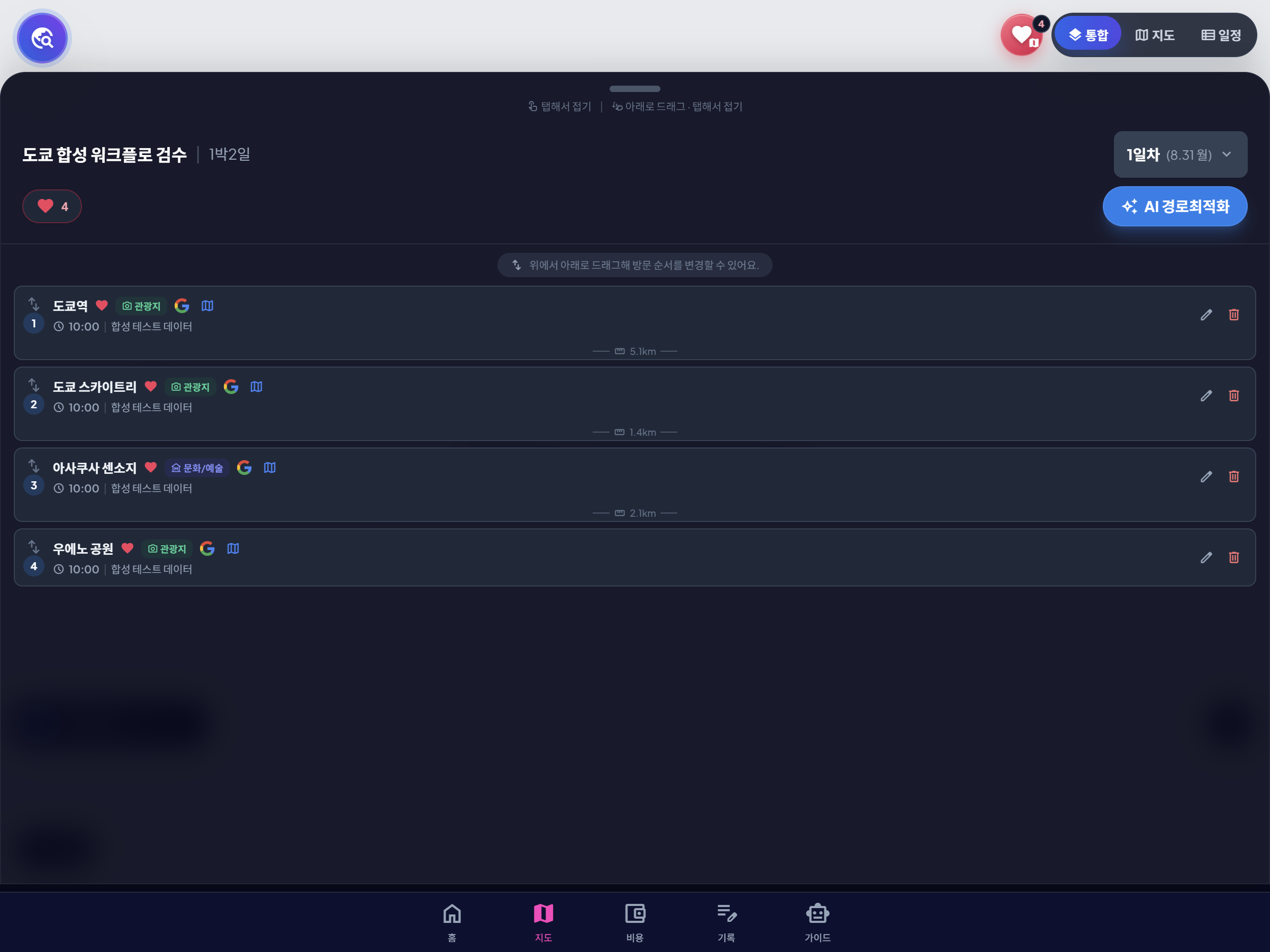
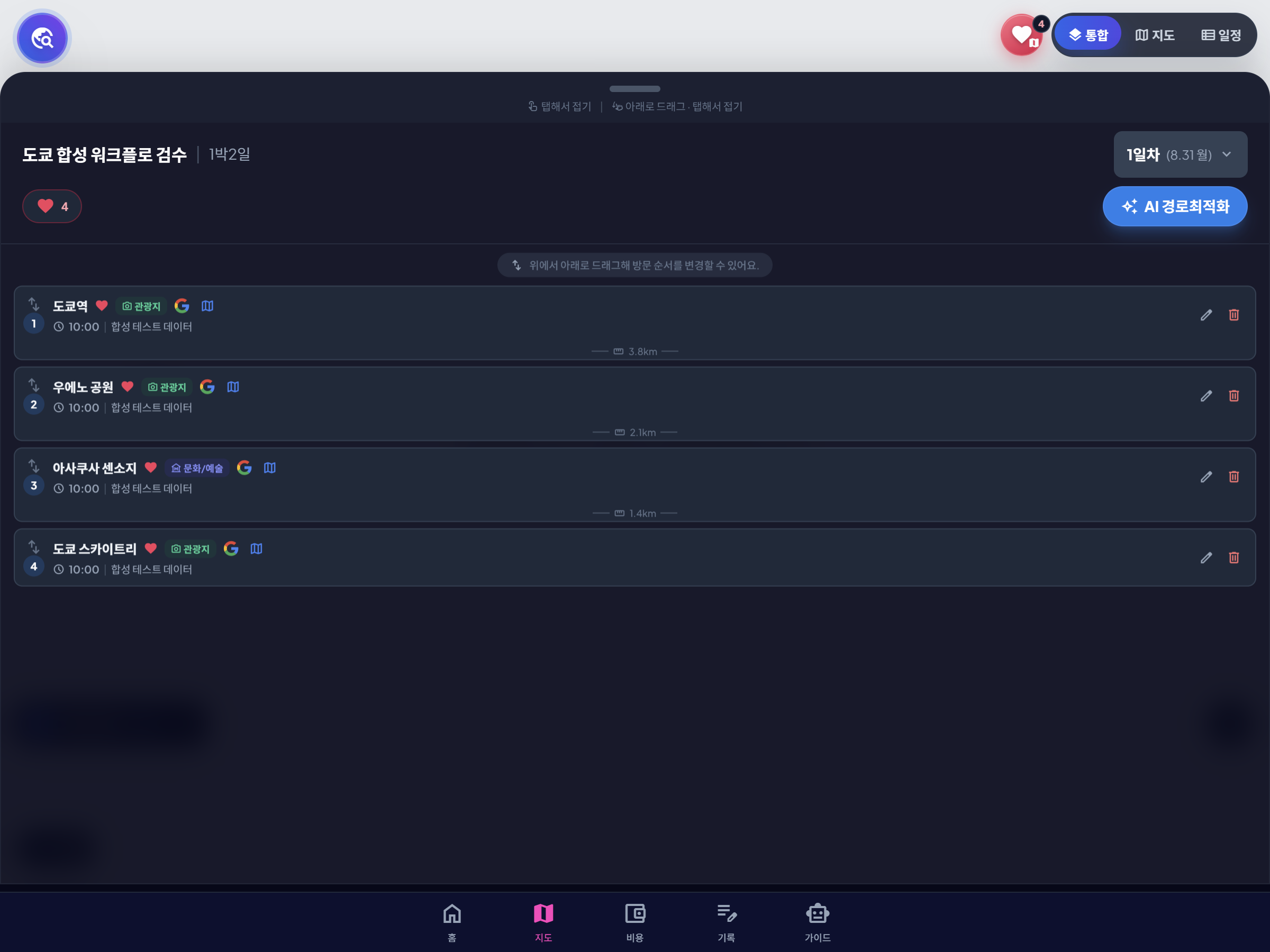
The save, assign, and reorder flow tested with a fictional trip on 2026-07-16 was replayed and captured in web /app on 2026-08-31 at Step 2 checkpoint 9563001. It is not an automatic sync with a Google account saved list.
Screen records

Downloadable audit files
-
Saved state JSON · JSON
Fictional trip and unscheduled candidate-place state
-
Before-sort state JSON · JSON
Itinerary order immediately after assigning candidates to a day
-
After-sort state JSON · JSON
Itinerary order after reordering the same places
-
Workflow audit CSV · CSV
Recorded input and outcome for each save, assign, and reorder step
Feature lists do not show whether a travel app supports the actual planning sequence. With a fictional trip, we checked three tasks in the current TripNotePlan web flow: save candidate places, assign them to a day, and reorder the same stops. The public evidence is limited to those tasks. This is a product workflow review, not a comparison or ranking of other apps.
The three-task workflow we checked
The key distinction was between a saved candidate and a scheduled stop. Four fictional candidate places first remained outside a fixed day. After they were assigned to day one, their order could be changed without changing the set of places.
Place search, live map accuracy, and cost entry are useful follow-up checks, but this evidence case does not present them as verified results.
| Task | Observed result | Decision it supports |
|---|---|---|
| Save candidates | Four places remained outside a fixed day | Keep or remove later |
| Assign to a day | The four candidates became day-one itinerary items | Daily scope |
| Reorder stops | The same places were placed in a new order | Visit sequence |
What to evaluate beyond the tested flow
A map is useful only if it changes the itinerary. After assigning places to a day, look for a route that jumps across the city, a first stop far from the hotel, or a final stop that makes the return difficult.
The app should also allow manual correction. Automated order is not enough because opening hours, meals, accessibility, luggage, and timed tickets can justify a route that is not the shortest one.
- Candidates can stay unscheduled until a decision is made.
- Check separately whether stops can move between days as well as positions.
- Check separately whether the map reflects the same places shown in the daily list.
- Check separately whether budget entries can be attached to the same trip context.
Capabilities this test did not prove
This test did not measure navigation accuracy, live transit, booking availability, receipt extraction, offline access, or market-wide feature quality. Those require separate tests and current external data.
Public sharing also needs its own privacy review. Regardless of the app, do not place passport numbers, full booking references, payment details, home addresses, or private contact information in notes that may be shared.
A short acceptance test for any itinerary app
Before moving a real trip into a new app, create a two-day fictional trip and complete the three tasks above. Then remove one stop, move another to day two, and check the map and budget separately.
If a simple change requires rebuilding the whole plan, the app may be good at collecting ideas but weak at itinerary maintenance. The useful test is not how many features appear in the menu, but whether one decision updates the rest of the planning flow.
Action checklist
- Test with fictional data before importing a real trip.
- Keep saved candidates separate from scheduled stops.
- Change the day and order, then inspect the saved state again.
- Evaluate sharing and sensitive notes as a separate privacy task.
Sources checked
- Google Maps Help · Create a list of places (checked )